
Check names and numbers
Automatic transcription can mishear product names, prices, and technical terms. Correct those before exporting.
TIGHTENAI FOR IPHONE
Make your edited video easier to follow with the sound off. TightenAI creates captions from English speech in your footage, then lets you correct the text and choose how it looks on the video.
Cloud AI processing requires a subscription. Review the plan and trial terms before purchase.
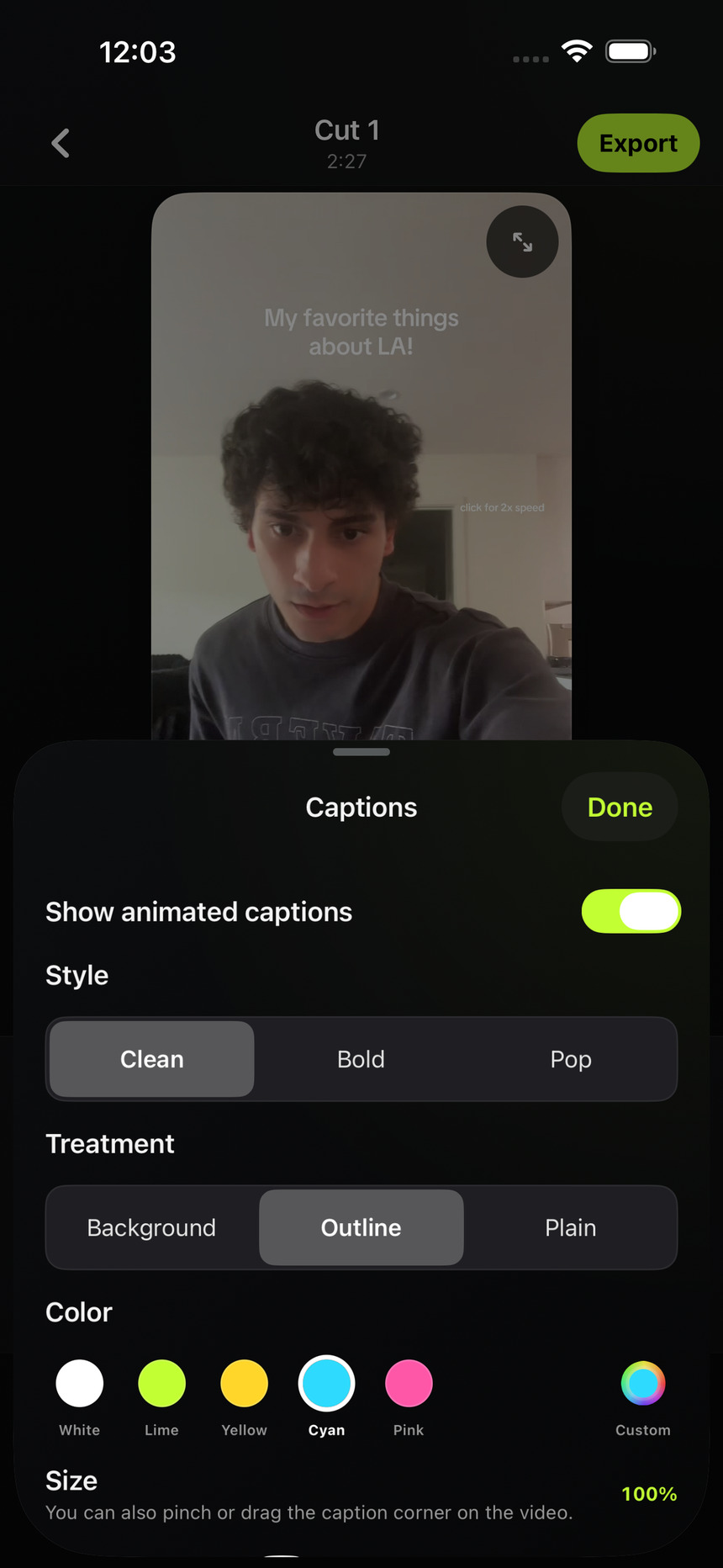
Captions are useful for spoken tutorials, product explanations, and talking-head posts. They should reflect what the person actually said and remain readable over the footage. Use the automatic transcript as a starting point, then give names and important details a final check.
HOW IT WORKS
Import or record footage in TightenAI and let the automatic edit finish. Open the result in the editor to review the video and its captions together.
Open Captions to choose the style, size, and color. Tap a caption on the video to rewrite it. Drag it up or down to change its position or use its resize control to adjust the size.
Watch the entire cut with captions enabled. Check the text against the audio, then export an MP4 with the captions rendered into the video. TightenAI does not add a watermark.
BEFORE YOU POST
Automatic transcription can mishear product names, prices, and technical terms. Correct those before exporting.
Leave space around the edges and lower part of the video so social-app buttons and descriptions do not cover key words.
Use a readable size and treatment that stays visible across both light and dark moments in your footage. An outline can help on a changing background.
Yes. Tap a caption on the video to rewrite it. You can correct transcription errors without rerecording your footage.
Yes. Captions can be repositioned and resized in the editor. The caption controls also let you change their style and color.
Yes. When captions are enabled for export, they are rendered into the MP4. Preview the exported file before posting to make sure it looks right in your chosen format.
Cloud transcription currently processes English speech. Background noise, overlapping voices, names, and unusual vocabulary can lead to errors. Always review captions, especially factual details and required disclosures.
Choose your plan on the website, then sign in with the same account in the iPhone app.
See plans and trial detailsAlready subscribed? Get the iPhone app ↗